
Telco Churn
Package Imports
Instantiate Xplainable Cloud
Initialise the xplainable cloud using an API key from: https://platform.xplainable.io/
This allows you to save and collaborate on models, create deployments, create shareable reports.
Read IBM Telco Churn Dataset
Sample of the IBM Telco Churn Dataset
| CustomerID | Count | Country | State | City | Zip Code | Lat Long | Latitude | Longitude | Gender | ... | Contract | Paperless Billing | Payment Method | Monthly Charges | Total Charges | Churn Label | Churn Value | Churn Score | CLTV | Churn Reason | |
|---|---|---|---|---|---|---|---|---|---|---|---|---|---|---|---|---|---|---|---|---|---|
| 0 | 3668-QPYBK | 1 | United States | California | Los Angeles | 90003 | 33.964131, -118.272783 | 33.9641 | -118.273 | Male | ... | Month-to-month | Yes | Mailed check | 53.85 | 108.15 | Yes | 1 | 86 | 3239 | Competitor made better offer |
| 1 | 9237-HQITU | 1 | United States | California | Los Angeles | 90005 | 34.059281, -118.30742 | 34.0593 | -118.307 | Female | ... | Month-to-month | Yes | Electronic check | 70.7 | 151.65 | Yes | 1 | 67 | 2701 | Moved |
| 2 | 9305-CDSKC | 1 | United States | California | Los Angeles | 90006 | 34.048013, -118.293953 | 34.048 | -118.294 | Female | ... | Month-to-month | Yes | Electronic check | 99.65 | 820.5 | Yes | 1 | 86 | 5372 | Moved |
| 3 | 7892-POOKP | 1 | United States | California | Los Angeles | 90010 | 34.062125, -118.315709 | 34.0621 | -118.316 | Female | ... | Month-to-month | Yes | Electronic check | 104.8 | 3046.05 | Yes | 1 | 84 | 5003 | Moved |
| 4 | 0280-XJGEX | 1 | United States | California | Los Angeles | 90015 | 34.039224, -118.266293 | 34.0392 | -118.266 | Male | ... | Month-to-month | Yes | Bank transfer (automatic) | 103.7 | 5036.3 | Yes | 1 | 89 | 5340 | Competitor had better devices |
1. Data Preprocessing
Turn Label into Binary input
Preprocessed data
| City | Gender | Senior Citizen | Partner | Dependents | Tenure Months | Phone Service | Multiple Lines | Internet Service | Online Security | Online Backup | Device Protection | Tech Support | Streaming TV | Streaming Movies | Contract | Paperless Billing | Payment Method | Monthly Charges | Churn Label | |
|---|---|---|---|---|---|---|---|---|---|---|---|---|---|---|---|---|---|---|---|---|
| 0 | los angeles | male | no | no | no | 2 | yes | no | dsl | yes | yes | no | no | no | no | month-to-month | yes | mailed check | 53.85 | 1 |
| 1 | los angeles | female | no | no | yes | 2 | yes | no | fiber optic | no | no | no | no | no | no | month-to-month | yes | electronic check | 70.7 | 1 |
| 2 | los angeles | female | no | no | yes | 8 | yes | yes | fiber optic | no | no | yes | no | yes | yes | month-to-month | yes | electronic check | 99.65 | 1 |
| 3 | los angeles | female | no | yes | yes | 28 | yes | yes | fiber optic | no | no | yes | yes | yes | yes | month-to-month | yes | electronic check | 104.8 | 1 |
| 4 | los angeles | male | no | no | yes | 49 | yes | yes | fiber optic | no | yes | yes | no | yes | yes | month-to-month | yes | bank transfer (automatic) | 103.7 | 1 |
Create Preprocessor to Persist to Xplainable Cloud
Loading the Preprocessor steps
Use the api to load pre-existing preprocessor steps from the xplainable cloud and transform data inplace.
Create Train/Test split for model training validation
2. Model Optimisation
The XParamOptimiser is utilised to fine-tune the hyperparameters of our model. This
process searches for the optimal parameters that will yield the best model performance,
balancing accuracy and computational efficiency.
3. Model Training
With the optimised parameters obtained, the XClassifier is trained on the dataset.
This classifier undergoes a fitting process with the training data, ensuring that it
learns the underlying patterns and can make accurate predictions.
4. Model Interpretability and Explainability
Following training, the model.explain() method is called to generate insights into the
model's decision-making process. This step is crucial for understanding the factors that
influence the model's predictions and ensuring that the model's behaviour is transparent
and explainable.
The image displays two graphs related to a churn prediction model.
On the left is the 'Feature Importances' bar chart, which ranks the features by their ability to predict customer churn. 'Tenure Months' has the highest importance, confirming that the length of customer engagement is the most significant indicator of churn likelihood. 'Monthly Charges' and 'Contract' follow, suggesting that financial and contractual commitments are also influential in churn prediction.
The right graph is a 'Contributions' histogram, which quantifies the impact of a specific feature's values on the prediction outcome. The red bars indicate that higher values within the selected feature correspond to a decrease in the likelihood of churn, whereas the green bars show that lower values increase this likelihood.
The placement of 'Gender' at the bottom of the 'Feature Importances' chart conclusively indicates that the model does not consider gender a determinant in predicting churn, thereby ensuring the model's impartiality regarding gender.
5. Model Persisting
In this step, we first create a unique identifier for our churn prediction model using
client.create_model_id. This identifier, shown as model_id, represents the newly
instantiated model which predicts the likelihood of customers leaving within the next
month. Following this, we generate a specific version of the model with
client.create_model_version, passing in our training data. The output version_id
represents this particular iteration of our model, allowing us to track and manage
different versions systematically.
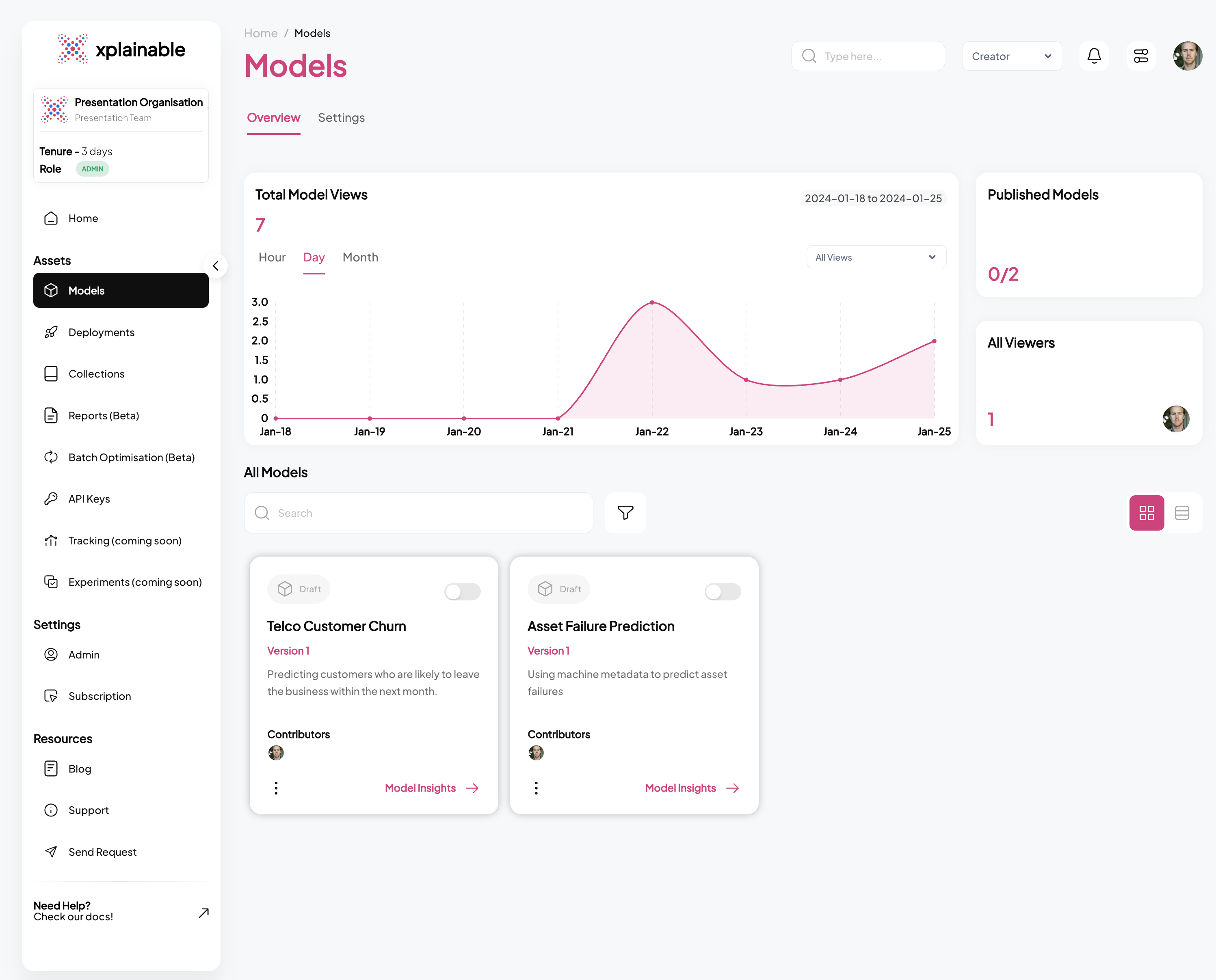
SaaS Models View
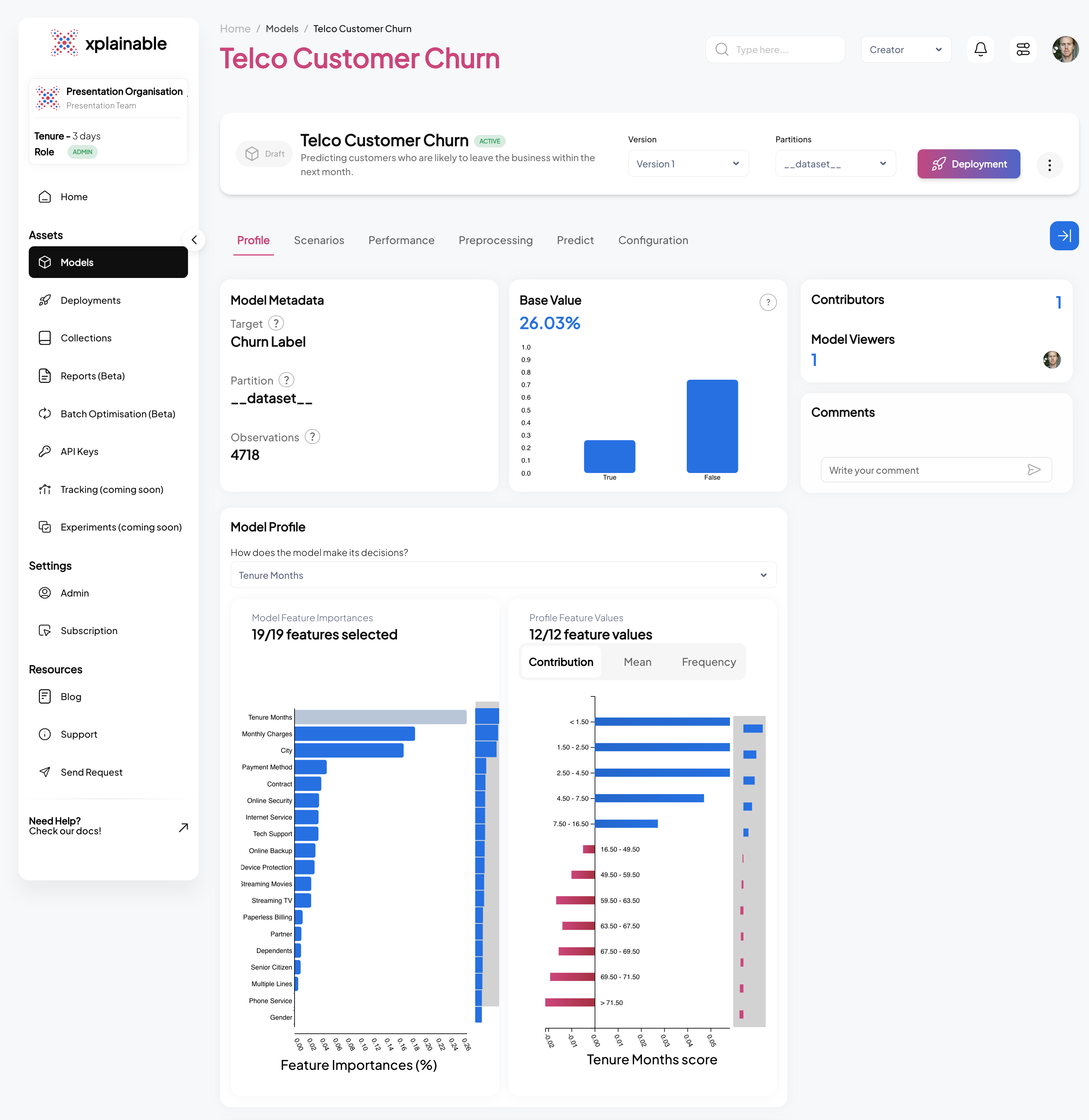
SaaS Explainer View
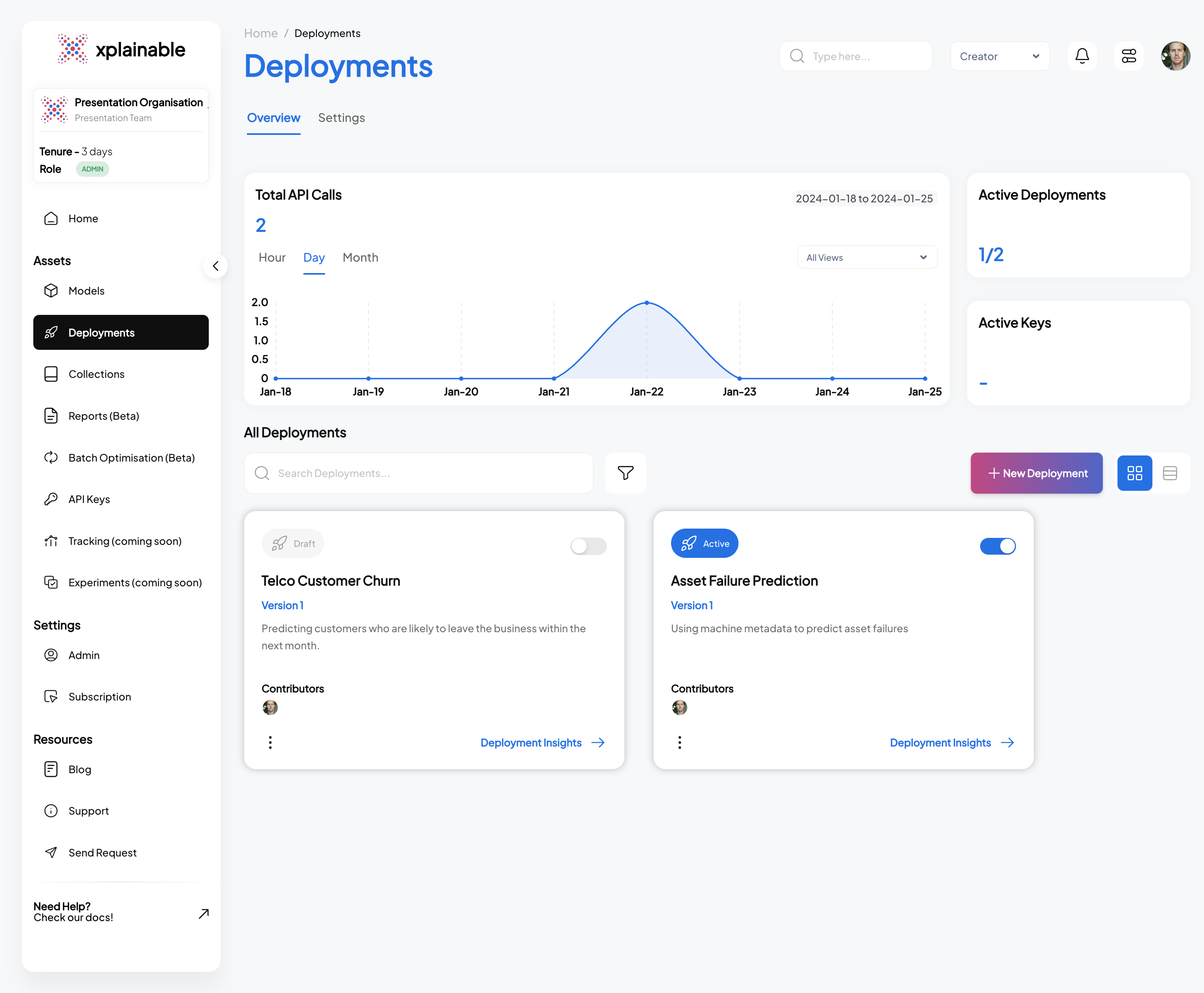
6. Model Deployment
The code block illustrates the deployment of our churn prediction model using the
client.deployments.deploy function. The deployment process involves specifying the
unique model_version_id that we obtained in the previous steps. This step effectively
activates the model's endpoint, allowing it to receive and process prediction requests.
The deployment response confirms the successful deployment with a deployment_id and
other relevant information.
SaaS Deployment View
Testing the Deployment programatically
This section demonstrates the steps taken to programmatically test a deployed model. These steps are essential for validating that the model's deployment is functional and ready to process incoming prediction requests.
- Activating the Deployment: The model deployment is activated using
client.activate_deployment, which changes the deployment status to active, allowing it to accept prediction requests.
- Creating a Deployment Key: A deployment key is generated with
client.generate_deploy_key. This key is required to authenticate and make secure requests to the deployed model.
- Generating Example Payload: An example payload for a deployment request is
generated by
client.generate_example_deployment_payload. This payload mimics the input data structure the model expects when making predictions.
- Making a Prediction Request: A POST request is made to the model's prediction endpoint with the example payload. The model processes the input data and returns a prediction response, which includes the predicted class (e.g., 'No' for no churn) and the prediction probabilities for each class.
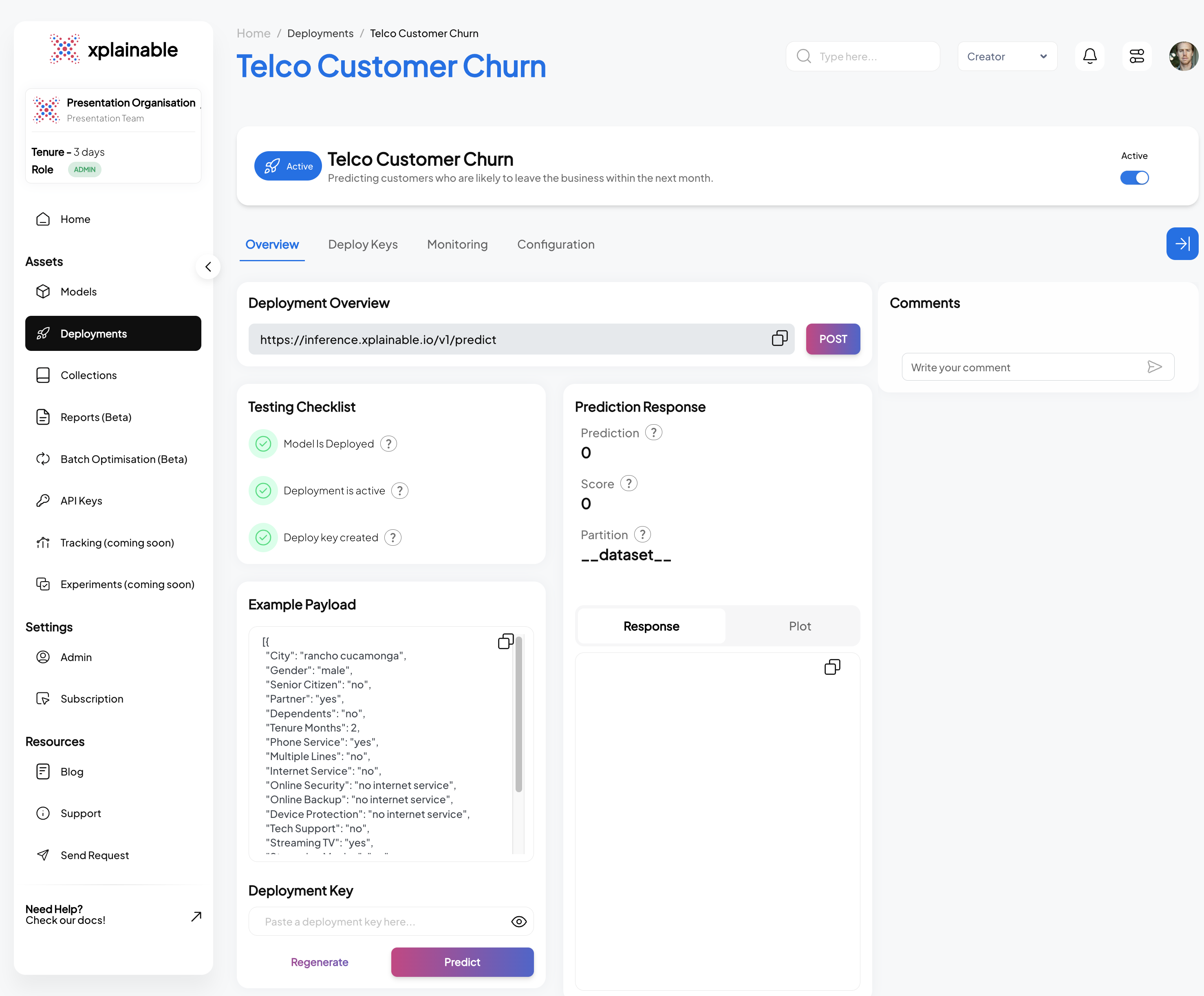
SaaS Deployment Info
The SaaS application interface displayed above mirrors the operations performed programmatically in the earlier steps. It displays a dashboard for managing the 'Telco Customer Churn' model, facilitating a range of actions from deployment to testing, all within a user-friendly web interface. This makes it accessible even to non-technical users who prefer to manage model deployments and monitor performance through a graphical interface rather than code. Features like the deployment checklist, example payload, and prediction response are all integrated into the application, ensuring that users have full control and visibility over the deployment lifecycle and model interactions.
Rendering AI-Generated Reports in Markdown
When working with AI-generated reports, readability is key. Instead of printing raw text, we can render the output directly as Markdown inside a Jupyter Notebook.
This allows us to use headings, lists, and other formatting styles, making the report much easier to consume and present.